The Visual Studio Code is a great tool which I use sometimes to write/debug code snippets. It’s got everything you’d want: it’s modern, free, has got cloud plugins, it’s well documented, etc.
For a full experience you can integrate it easily with build/debugging tools. That’s what I did with C++/MSYS64 then you hit CTRL+F5 and it snaps a new build right away 😀
Let’s say you are less than perfect and sometimes after a build you get some build errors.
A dialog pops up asking if you want to see the errors or simply “Debug anyway” which will take you in a debug session on the old executable. Not sure who would use that, especially since you hit CTRL+F5 (run without debugging) and not the F5 (start debugging)

Maybe that choice comes unexpected so you “Debug anyway” then tick the “Remember my choice in user settings”. Aaand that spells trouble :)) on new builds you’ll go auto-debug the old code, instead of some popup showing / clearly showing the Problems tab
To restore showing the dialog on future builds you need to go to:
File > Preferences > Settings, then search for the “On Task Errors” then simply change to “prompt”
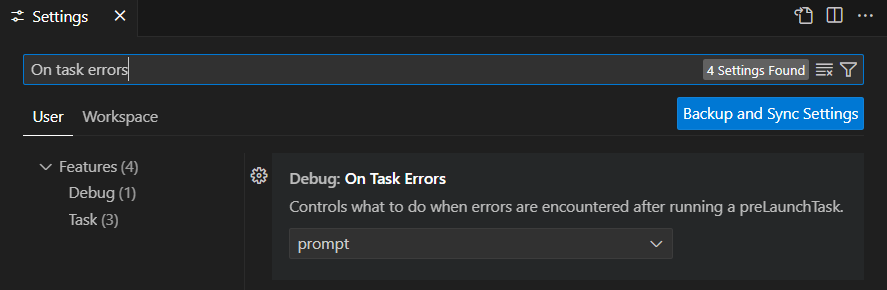
Note, the above are valid at least with Visual Studio Code version 1.92.0
Keywords: VSCode, Visual Studio Code, show build popup, show build errors dialog, revert rember my choice